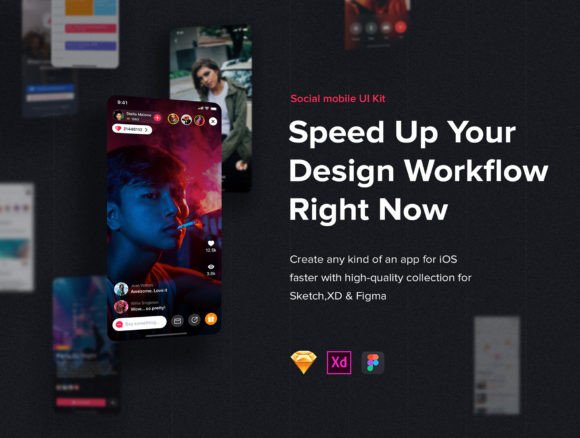
Jazam: Social Mobile App UI Kit
Designing a social networking application from scratch is often a balancing act between aesthetic appeal and functional clarity. For many creators, the blank canvas is not just intimidating; it is time-consuming. This is where a structured design system becomes invaluable. Jazam - Social Mobile App UI Kit offers a curated collection of delicate social networking screen templates and UI elements designed to streamline the interface design process. By providing a robust foundation, it allows designers to focus on unique brand identity rather than reinventing standard interaction patterns.
The kit includes thirty social app screens specifically optimized for iPhone X resolution, ensuring that modern display standards are met without extra effort. But beyond the pixel dimensions, the true value lies in its technical construction. The file incorporates recent design features such as Symbols or Components, Overrides, Resize Options, Text, and Layer Styles. These technical capabilities mean that the kit is not merely a static image set but a flexible, living design resource that adapts to your workflow.
Why Structure Matters in Social App Design
Social media interfaces are deceptively complex. Users expect intuitive navigation, seamless content consumption, and easy interaction mechanisms like liking, commenting, and sharing. When these elements are inconsistent, user retention drops. Jazam - Social Mobile App UI Kit addresses this by offering pre-tested layouts that adhere to contemporary usability standards. For a designer, this means less time debating button placement and more time refining the user journey.
The inclusion of components and overrides is particularly significant for maintaining consistency. In a social app, a profile card might appear in a feed, a search result, or a direct message. With traditional static designs, updating one instance requires manually updating every other instance. With the component-based structure found in Jazam, a change to the master symbol propagates across all screens. This ensures visual harmony and drastically reduces the risk of human error during the design phase.
Perspectives for Different Creators
The utility of a UI kit varies significantly depending on who is holding the mouse. Understanding how different audiences interact with Jazam - Social Mobile App UI Kit can help you determine if it aligns with your current project needs.
For Beginners and Students
If you are new to interface design, starting with a professional-grade kit serves as an educational tool. Rather than guessing how to structure a news feed or a settings page, you can deconstruct the layers provided in Jazam. You can examine how text styles are applied, how spacing is managed using resize options, and how layer styles create depth. This reverse-engineering approach accelerates learning, allowing beginners to understand industry-standard practices by observing them in action. It bridges the gap between theoretical knowledge and practical application.
For Freelancers and Agencies
Time is the most valuable currency for freelancers and agency teams. Client deadlines are often tight, and budget constraints may not allow for weeks of custom UI exploration. Here, the primary benefit of Jazam - Social Mobile App UI Kit is speed. By utilizing the thirty pre-optimized screens, a freelancer can present a high-fidelity prototype to a client in a fraction of the usual time. The ability to quickly swap out text and images using overrides allows for rapid iteration based on client feedback. This efficiency does not compromise quality; instead, it ensures that the baseline design is polished, freeing up resources to customize specific branding elements.
For Entrepreneurs and Startup Founders
Non-technical founders often struggle to communicate their vision to developers. A vague idea of a "social network" can lead to misaligned expectations and costly development reworks. Using a comprehensive UI kit like Jazam allows entrepreneurs to create tangible visual representations of their product. Whether you are pitching to investors or hiring a development team, having a clear, clickable prototype demonstrates seriousness and clarity. It helps identify potential usability issues before a single line of code is written, saving significant capital in the long run. The fact that the concept works for both web and mobile apps adds versatility for startups planning a multi-platform launch.
For Experienced UI/UX Designers
Seasoned designers might worry that using a kit limits creativity. However, professionals often view kits like Jazam - Social Mobile App UI Kit as a starting block, not a finish line. The value here is in the "delicate" nature of the templates—they are clean and unobtrusive, making them easy to adapt to specific brand guidelines. Experienced users can leverage the robust layer styles and symbols to build a custom design system on top of the provided foundation. They appreciate the technical fidelity, such as proper naming conventions and organized layer structures, which make handoff to developers smoother and more reliable.
Evaluating Flexibility and Technical Features
When considering any design resource, flexibility is key. A rigid template that breaks when you add more text is useless in real-world scenarios. Jazam addresses this through its use of resize options and dynamic text handling. For example, if a user’s name is longer than anticipated, the UI element should adjust gracefully without overlapping other content. The kit’s construction supports this adaptability, ensuring that the design remains intact regardless of content variations.
Furthermore, the optimization for iPhone X resolution is a critical detail. Modern smartphones have unique aspect ratios and safe areas that must be respected. By designing specifically for these dimensions, the kit ensures that headers, footers, and interactive elements are positioned correctly, avoiding common pitfalls like content being hidden behind notches or home indicators. This attention to detail reflects a deep understanding of current mobile hardware constraints.
Practical Application Examples
To visualize how this kit integrates into a workflow, consider a blogger launching a community app. They need a clean, readable feed for articles and a simple profile section for contributors. Using Jazam, they can select the relevant screens, apply their brand colors via layer styles, and replace placeholder text with actual content. Within hours, they have a cohesive look and feel that can be tested with early users.
Alternatively, imagine a small business owner creating an internal communication tool for their team. They need functionality over flashiness. The clear interfaces provided by the UI kit ensure that employees can navigate the app easily, reducing training time. The professional appearance also boosts employee adoption rates, as the tool feels reliable and well-built.
Making the Right Choice for Your Project
Deciding whether to use Jazam - Social Mobile App UI Kit depends on your specific goals. If you prioritize rapid prototyping, consistency, and modern technical standards, this kit offers substantial value. It is particularly suited for those who need to balance speed with quality. However, if your project requires highly unconventional interactions or a radically unique visual language, you may find yourself spending more time overriding the defaults than building from scratch. In such cases, the kit might serve better as a reference than a base.
It is also worth noting that design is iterative. You can download this UI kit to create something new, but you can also combine it with other resources. The modular nature of the components means you can pick and choose elements that fit your needs, discarding what doesn’t. This hybrid approach allows for maximum creativity while still benefiting from the structural integrity of a professional template.
Ultimately, tools like Jazam democratize high-quality design. They lower the barrier to entry for beginners while providing efficiency gains for experts. By understanding the features—such as symbols, overrides, and responsive layouts—you can better assess how this kit fits into your design ecosystem. Whether you are building the next big social platform or a niche community app, having a solid, flexible foundation allows you to focus on what truly matters: connecting people through meaningful digital experiences.