Mastering the Seamless Instagram Carousel for Higher Engagement
In the crowded landscape of social media, standing out requires more than just posting content; it demands a strategic approach to visual storytelling. One of the most effective tools for capturing attention and retaining viewer interest is the Seamless Instagram Carousel. This format allows creators to break down complex ideas into digestible slides while maintaining a cohesive visual narrative that flows from one image to the next. However, many users overlook the technical and design nuances that make these carousels truly effective. By understanding common pitfalls and adopting best practices, you can transform your Instagram gallery into a powerful marketing asset.
Understanding the Power of Continuity
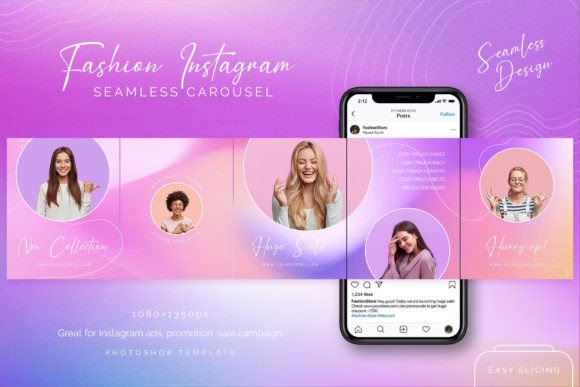
A seamless carousel is not merely a collection of individual images posted in sequence. It is a unified design where elements bleed across slide boundaries, creating an illusion of continuity. When a user swipes left, the background, graphics, or text continue smoothly, encouraging them to keep interacting with the post. This mechanic significantly boosts dwell time, a key metric Instagram’s algorithm favors. Whether you are sharing educational tips, showcasing products, or telling a brand story, the seamless effect keeps the audience engaged longer than static posts or disjointed slides.
The appeal lies in the unicorn design aesthetic often associated with these templates—vibrant mesh gradients, rainbow textures, and colored backgrounds that pop on mobile screens. These visual elements are not just decorative; they guide the eye and create a memorable brand impression. Yet, achieving this look requires more than just picking pretty colors. It demands precision in layout and an understanding of how Instagram crops and displays images.
Common Mistakes That Break the Illusion
Despite the popularity of carousel posts, many creators make avoidable errors that diminish their impact. Recognizing these issues is the first step toward creating professional-grade content.
Ignoring Aspect Ratio Constraints
One of the most frequent mistakes is using incorrect dimensions. Instagram supports various aspect ratios, but for carousels, consistency is crucial. If your slides vary in size or do not adhere to the optimal 1080×1350 px portrait format, the seamless effect will break. Users may see white bars or misaligned graphics when swiping, which disrupts the flow and looks unprofessional. Always ensure your template is set to the correct resolution before you begin designing.
Overcrowding Slides with Information
Another common error is trying to pack too much information into a single slide. While the goal is to provide value, cluttered designs overwhelm viewers. A seamless carousel should balance text and whitespace. If a slide is too dense, users are likely to scroll past rather than swipe through. Instead, spread your message across the five posts included in a typical template. Use each slide to highlight one key point, ensuring the text is legible and the visuals support the message without competing for attention.
Neglecting the "Puzzle Effect" Planning
Many users treat carousel slides as isolated units, forgetting that they can also function as a puzzle grid on their profile. When posted separately, these images can form a larger mosaic on your feed. Failing to plan for this dual functionality means missing out on an opportunity to attract subscribers through your profile’s overall aesthetic. Before exporting, preview how the individual images look in a grid view. Ensure that key elements are not cut off and that the color palette remains harmonious across all posts.
Choosing the Right Template for Your Needs
Selecting a high-quality template can save hours of design time, but not all templates are created equal. When evaluating a Seamless Instagram Carousel package, look for specific features that enhance usability and flexibility.
- Fully Editable PSD Files: Ensure the template is provided in Photoshop format (PSD) with organized layers. This allows you to easily type texts, place photos, and adjust colors without disrupting the underlying design structure.
- Free Fonts and Assets: Templates that rely on obscure, paid fonts can create unnecessary hurdles. Opt for designs that use free, widely available fonts or include them in the download. This ensures consistency and ease of editing.
- Help Files and Support: Even experienced designers can benefit from guidance. A template that includes a help file or offers free author support can troubleshoot issues quickly, saving you from frustration during tight deadlines.
The inclusion of mesh gradients and raining textures in modern templates adds a layer of sophistication. These elements are trendy and visually appealing, but they must be editable. Check if the template allows you to tweak these backgrounds to match your brand identity. A rigid design that cannot be customized limits its long-term value.
Best Practices for Editing and Exporting
Once you have selected a template, the editing process determines the final quality of your post. Here are practical steps to ensure a polished result.
Streamline Your Workflow
Start by organizing your content. Decide on the narrative arc of your carousel. What is the hook on the first slide? What is the call-to-action on the last? Map this out before opening Photoshop. This preparation prevents mid-design changes that can disrupt the seamless alignment. Use the Save for Web tool in Photoshop to export your images. This tool optimizes file size without sacrificing quality, ensuring fast loading times for users on mobile data.
Maintain Visual Consistency
Consistency extends beyond the carousel itself. Ensure that the colors and fonts used in your carousel align with your broader brand guidelines. If you are launching a promo campaign, use the same visual language across all five ads within the post. This reinforces brand recognition and makes your content instantly identifiable to your followers.
Leverage the Swipe Mechanic
Design with the swipe in mind. Place intriguing elements at the edge of each slide to encourage users to move to the next. For example, an arrow pointing right or a sentence that continues onto the next slide can subtly prompt interaction. This psychological cue increases completion rates, meaning more people see your entire message.
Maximizing Reach and Engagement
A well-designed carousel is a powerful tool for growth, but it must be paired with a strategic posting approach. Use all five pictures in one post to maximize the algorithmic boost from multiple swipes. Alternatively, post them separately to create a puzzle effect in your Instagram profile, attracting new visitors who browse your grid. Both strategies have merit, depending on your immediate goals.
To attract lots of customers, focus on providing useful information. Educational carousels that solve specific problems tend to perform better than purely promotional content. Position your product or service as the solution within the narrative. For instance, if you are selling digital art tools, show a before-and-after transformation across the slides, explaining the process step-by-step.
Remember, the goal is to make your shopping cards—or product showcases—easy to digest. Break down features into bite-sized benefits. Use clear headings and bullet points within the slides to improve readability. The unicorn design aesthetic should enhance, not overshadow, the content. Balance creativity with clarity to keep your audience engaged from the first slide to the last.
Final Considerations Before You Publish
Before hitting publish, review your carousel on a mobile device. Desktop previews can be misleading regarding spacing and font size. Check for alignment issues, especially where images meet. Ensure that no critical text is too close to the edges, where it might be obscured by Instagram’s interface elements like the caption or like button.
Investing in a high-quality, seamless template is a smart move for anyone looking to elevate their Instagram presence. It combines efficiency with professional design, allowing you to focus on content strategy rather than technical execution. By avoiding common mistakes and leveraging the full potential of these tools, you can create compelling narratives that resonate with your audience and drive meaningful results.
Whether you are a beginner looking to streamline your workflow or a professional aiming to refine your visual identity, the Seamless Instagram Carousel offers a versatile solution. Embrace the creative possibilities, pay attention to the details, and watch your engagement soar.